



Google Nexus 4 Review - Google's new Flagship
by Brian Klug on November 13, 2012 8:45 AM EST- Posted in
- Smartphones
- LG
- Android
- Mobile
- APQ8064
- Nexus 4
- Android 4.2
- MDM9215
Battery life in the Nexus 4 is a big concern for many, especially since the Nexus 4 isn’t designed to have a user replaceable battery. What’s inside is a 2100 mAh 3.8V battery which is 8.0 watt-hours. I had been wondering for a while what the chemical compound used in the 3.8V battery cells we’re seeing emerge was, and finally got a tad more info at least about the LG Chem approach. This is the higher voltage chemistry from LG Chem which is Lithium Cobalt Oxide (LiCoO2) based and includes electrolyte additives to prevent gas generation in the cell which affects lifetime during high temperature periods. Although getting the back off of the Nexus 4 is relatively easy and requires just removing two Torx 4 screws and prying up on the plastic, I doubt anyone is going to make a back to accommodate an extended battery due to the presence of 4 antennas which are integrated into the back cover.

The Nexus 4 incorporates wireless charging into that back alongside NFC. For wireless charging the Nexus 4 uses a TI BQ51051b wireless power Li-Ion charger receiver. I’ve been pretty remiss in looking into wireless charging and actually trying it myself, so I went ahead and bought a two-position Energizer Qi compliant charging mat.
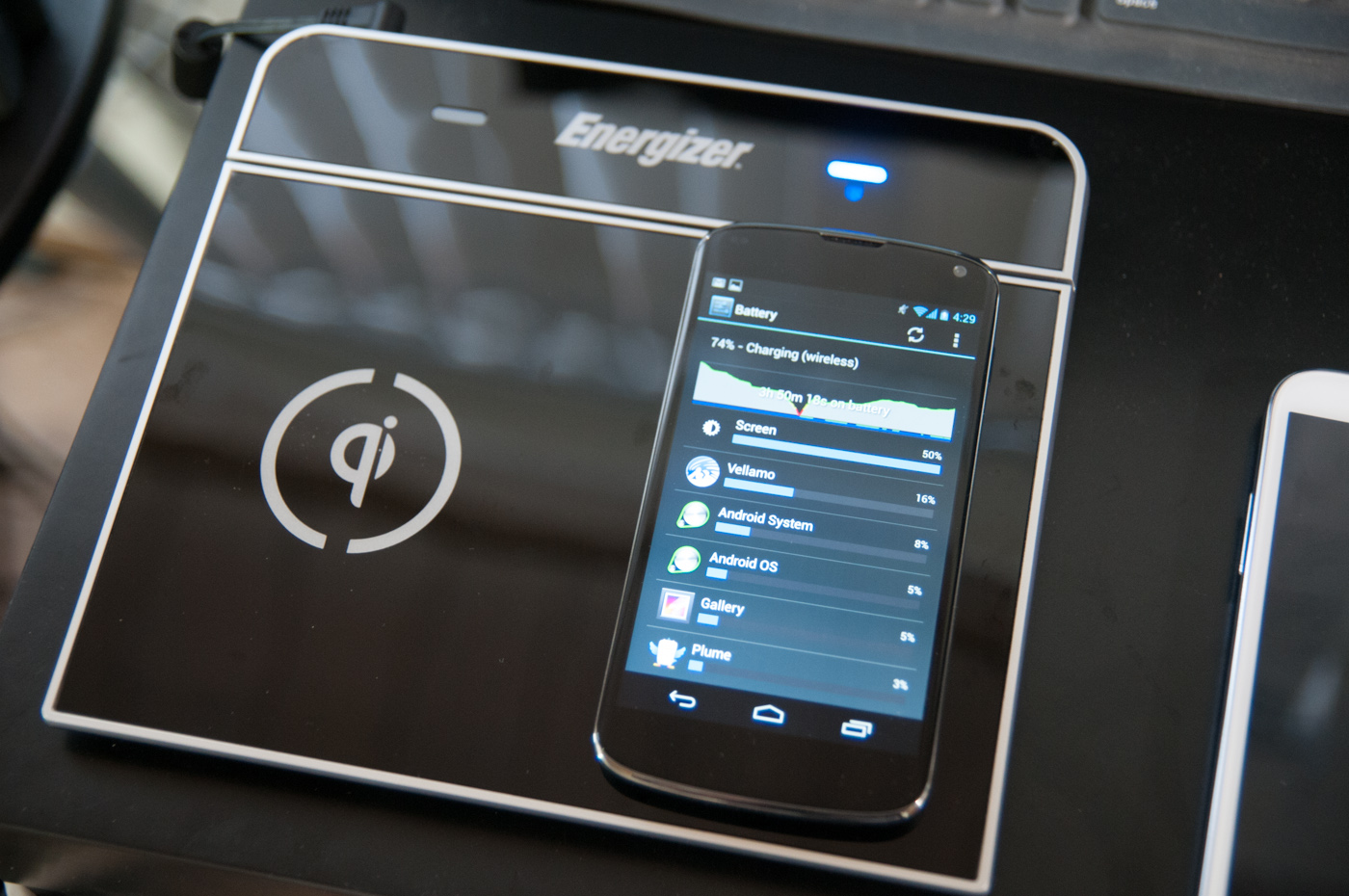
The Nexus 4 is Qi 1.1 wireless charging forum compliant, so any charger that is Qi compliant or includes the logo will charge it. Aligning the Nexus 4 on the Energizer mat is a bit tricky since the surface is slick and angled down, and the back of the Nexus 4 is primarily glass, but it isn’t difficult after you know where to align. The Nexus 4 charges from fully discharged to completely charged in 3.033 hours on the Qi mat, which is basically the same charge time as I saw off of microUSB on a BC 1.2 charger.
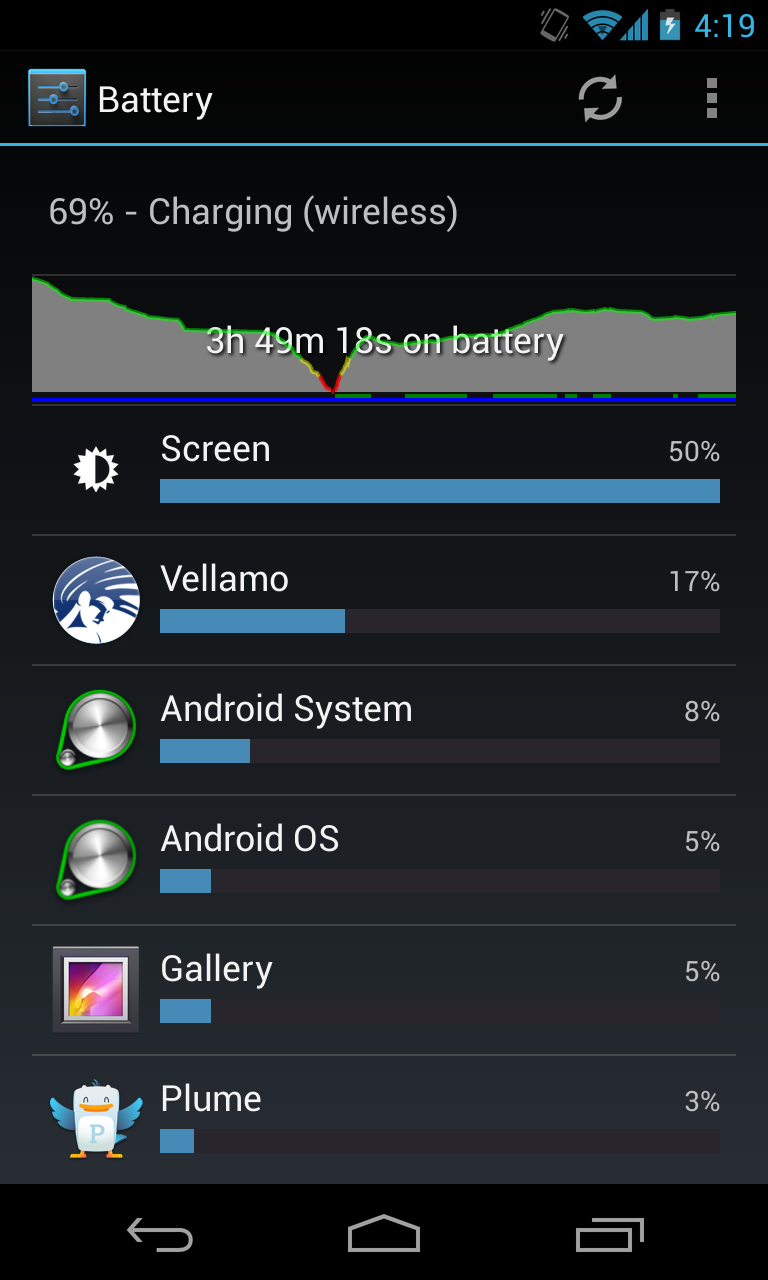
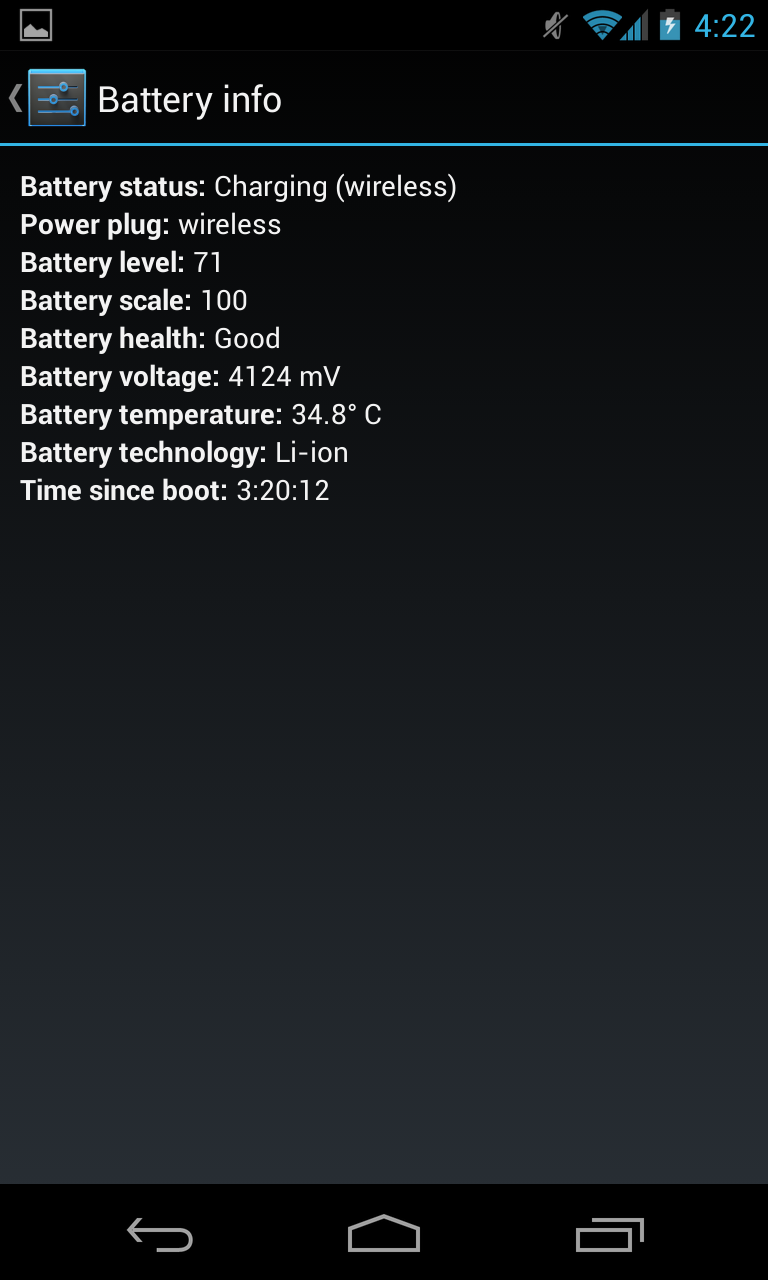
In Android you’ll see Charging (Wireless) when this mode is employed. I used the Palm Pre touchstone charger a lot back in the day and saw that get pretty hot during a charge cycle. The Nexus 4 doesn’t get nearly as warm. I’ve noticed that at the top of the charge cycle you’ll see the Nexus 4 selectively draw power from the charging dock since there doesn’t seem to be an equivalent trickle charge mode or something, but this is normal.
Battery Life
I’ve had the chance to run more battery life tests on the Nexus 4, and run the cellular test a few more times. The results are quite consistent and we don’t see that result change very much at all. I’ve also added the call time test and tethering results.
We regularly load web pages at a fixed interval until the battery dies (all displays are calibrated to 200 nits as always). The differences between this test and our previous ones boil down to the amount of network activity and CPU load.
On the network side, we’ve done a lot more to prevent aggressive browser caching of our web pages. Some caching is important otherwise you end up with a baseband test, but it’s clear what we had previously wasn’t working. I’ve made sure that despite the increased network load, the baseband still has the opportunity to enter its idle state during the course of the benchmark, we’re not destroying the RRC states with too aggressive of a load time.
We also increased CPU workload along two vectors: we decreased pause time between web page loads and we shifted to full desktop web pages, some of which are very JS heavy. The end result is a CPU usage profile that mimics constant, heavy usage beyond just web browsing. Everything you do on your smartphone ends up causing CPU usage peaks - opening applications, navigating around the OS and of course using apps themselves. Our 5th generation web browsing battery life test should map well to more types of smartphone usage, not just idle content consumption of data from web pages.
As always we test across multiple air interfaces (3G, 4G LTE, WiFi), but due to the increased network load we actually find that on a given process technology we see an increase in battery life on faster network connections. The why is quite simple to understand: the faster a page is able to fully render, the quicker all components can drive down to their idle power states. All Android tests use Chrome and 5GHz WiFi unless otherwise listed.
The tethering test still consists of four tabs of the webpage tests in conjunction with a 128 kbps streaming MP3 radio station over the smartphone’s personal WiFi hotspot.
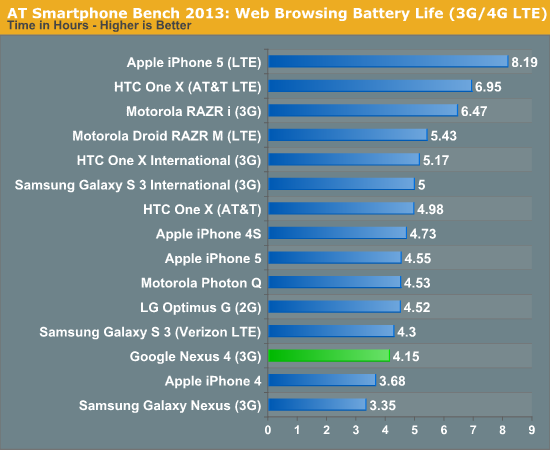
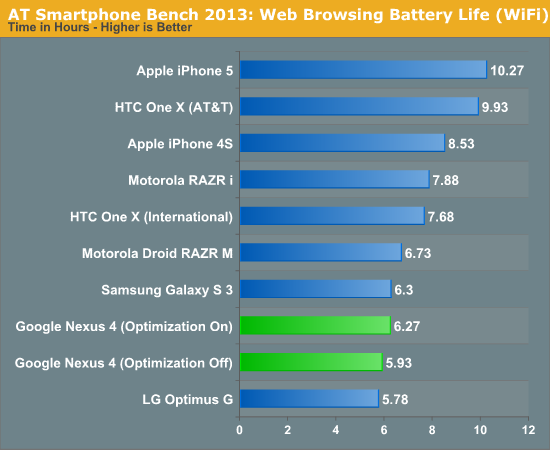
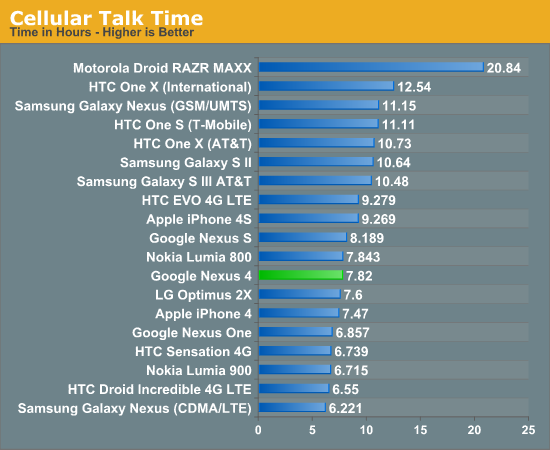
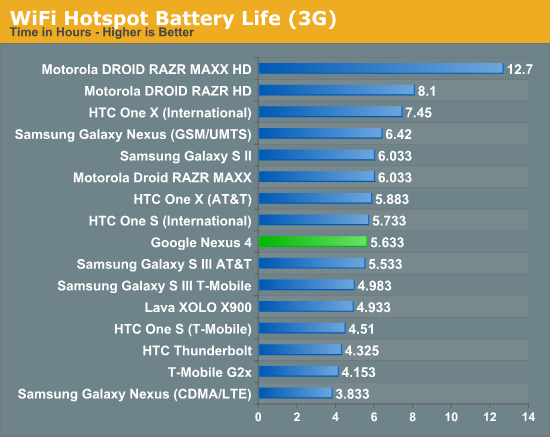
I've run and re-run the battery life tests on the Nexus 4 and they haven't changed since our preview a whole bunch. The result is battery life that isn't really chart topping, yet in my time with the Nexus 4 I haven't really been want for more battery life at any point. I'm able to get through a single day with the device set on auto brightness.


 Facebook
 Twitter
 RSS
RSS


188 Comments
View All Comments
dae_aosp_omg - Tuesday, November 13, 2012 - link
Good job seriously.Brian Klug - Tuesday, November 13, 2012 - link
Thanks :)Hopefully minimal errors in here, working on no sleep this time!
-Brian
WiWavelength - Tuesday, November 13, 2012 - link
Hi Brian...Since the Nexus 4 is a 3GPP only device, shouldn't the entry tag be the MDM9215, instead of the MDM9615?
AJ
Brian Klug - Tuesday, November 13, 2012 - link
Yeah you're right, I just tab-completed and it went with 9615 since we don't have a 9215 tag yet, fixing!-Brian
blanarahul - Sunday, July 7, 2013 - link
"I heard that a smartphone based on the Optimus G would be the next Nexus phone and was quite simply blown away. Nexus has rarely been first to the latest and greatest in terms of hardware platforms, and certainly there was no way that combination would be inexpensive. For Google to nail the next Nexus phone it would have to be a combination of both"The first time I read the article, I agreed with this sentence. But now I don't. HTC J Butterfly was released two months later. And it is the only phone (apart from Nexus 4) which is competitive in 2013. It would have been best if the next Nexus was based on HTC J Butterfly. Even if it ended up costing 50$ more.
chrone - Tuesday, November 13, 2012 - link
thanks for the storage benchmark! nice improvement there over galaxy nexus. :)at80eighty - Tuesday, November 13, 2012 - link
Brian, sorry to threadjack - any clue when you're expecting the Lumia 920 review to happen? just curious what AT's take on the weight is, more than anything elseJedi2155 - Thursday, November 15, 2012 - link
"The other common design element between the Optimus G and Nexus 4 is that nonconductive metallic plastic ring which extends around the perimeter of the device. This is something that comes off as tacky in the US market but (I’m told) is still a somewhat attractive motif in the Korean market."I love how you described a chrome band here...haha.
krumme - Tuesday, November 13, 2012 - link
Agree. The part about the camera is a new benchmark for reviews!I would like som other performance test, but know its difficult.
soccerballtux - Tuesday, November 13, 2012 - link
+1.Going forward, I expect (Freezer) tests added to Anandtech's benchmarks. Please also add this to the benchmark comparison tools.