



Dell U2713HM - Unbeatable performance out of the box
by Chris Heinonen on October 4, 2012 12:00 AM ESTDell U2713HM Brightness and Contrast
Last review I changed how I measured brightness and contrast to use a 5x5 ANSI grid instead of solid black and white screens in order to provide more accurate data. I wasn’t sure how this would impact screens, making comparisons between models harder. Measuring the center square of the 5x5 ANSI grid, the maximum brightness I could obtain from the U2713HM is 343 nits, which is very close to the 350 nits listed in the specs. With the backlight set to minimum that drops down to 28 nits, giving you a wide range of brightness levels to choose from.
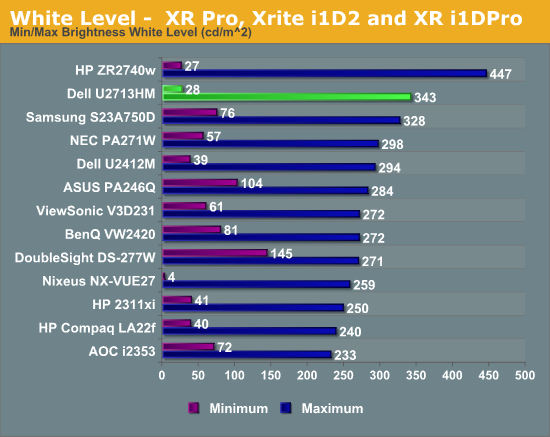
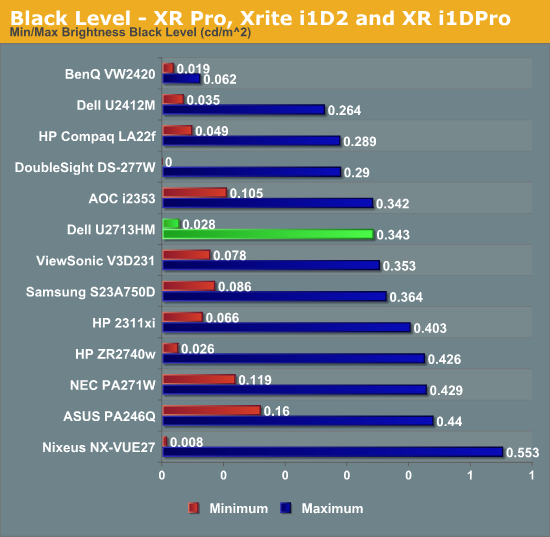
Black levels are where I expected the most impact with the new testing, since an ANSI grid prevents LED systems from going to full black. Preventing these systems from kicking in gives a much better real-world idea of the contrast ratio for a monitor. The U2713HM does a good job with the new measurements, as seen in the chart below.
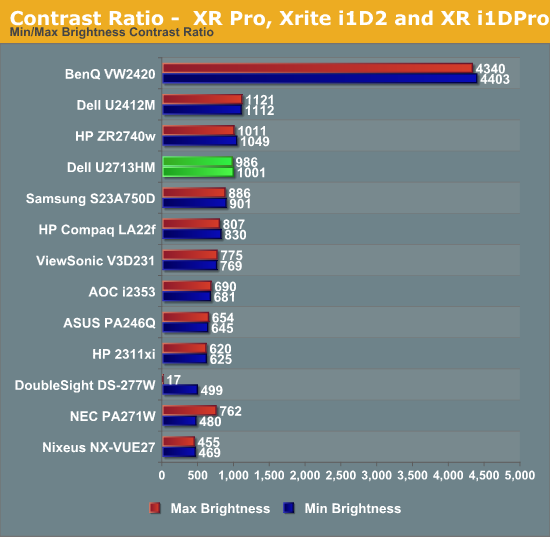
Figuring out the contrast ratio from the avove data is simple. There’s some slight rounding, but otherwise we see contrast ratios very close to 1000:1 for the display at both maximum and minimum brightness. This stacks up very well compared to all the other 27” displays that have been tested, and using a more stringent standard. The contrast numbers from the Dell are very good overall,
With a good foundation of brightness and contrast levels, it’s time to see how the Dell performs with color.


 Facebook
 Twitter
 RSS
RSS


101 Comments
View All Comments
cheinonen - Thursday, October 4, 2012 - link
The results are almost always the last 12 displays tested, as older ones rotate out of the spreadsheet and newer models rotate in. I'll try to grab the U2711 numbers for some of those, but the lag testing has totally changed since that was done, so the numbers might not be as accurate as they are now.JNo - Thursday, October 4, 2012 - link
I agree with EnzoFX. Because this is Dell who update their monitor lines every couple of years, a comparison with their previous models is important to see what improvements they've been able to make (if any) and also to see if it's worth aiming for the previous model if its still 'good enough' but cheaper.Comparison with the U2711 is also interesting because uses CCFL (usually wider gamut) as opposed to WLED and will continue to be sold alongside the U2713HM.
We compare the iphone 5 with the 4S and the galaxy S3 with the S2 and the 7970 with the 6970 so why not the same with the monitor lines?
ChuckDriver - Thursday, October 4, 2012 - link
While it's nice to see Dell dropping the price below the $1,000 mark, I lost interest in this article when I saw that the price was still over twice that of a Korean 27" IPS LCD monitor off of eBay. It is true that you are rolling the dice when you purchase one, are getting fewer features, and poorly translated documentation but at that large of a difference, I'll go for it. I've also heard that MicroCenter is offering these Korean 27" IPS monitors in their stores, with the return policy that you'd expect from a local store, so I may stop inside the next time I'm near one of their stores and pick one up.mevans336 - Thursday, October 4, 2012 - link
Dell currently has this one sale for $559 USD.http://accessories.ap.dell.com/sna/productdetail.a...
Despoiler - Thursday, October 4, 2012 - link
Ahh yah in Australia.peterfares - Thursday, October 4, 2012 - link
Dell Monitors in Australia are super cheap. I don't expect this monitor to drop much below $700 in the United States from the Dell website. You can get a Korean Catleap or Yamakasi for $290 shipped using fedex express 2 day from Korea. Or if you go to Microcenter they have the $400 models with extra ports and a scalar for $400 + tax.10101010 - Thursday, October 4, 2012 - link
It'd be quite useful if there was a standardized test for optical distortion. The last Dell U2711 I tried had really bad distortion from the anti-glare coating. I ended up going with the Apple 27" display even though it is something of a pain to use with Windows 7. It is amazing to see the quality of ClearType without the distortion of today's low quality anti-glare coatings. I'd have to think there would be some tests that could be developed to test optical distortion that would give readers an objective measure of the quality of the anti-glare coatings in common use today.I've read that there are some Korean companies offering 27" displays that have no front glass and no AG coatings. That might be ideal for optical quality, but cleaning the screen would be perilous.
It'd be great if Dell, HP, or another company would offer a quality 27" display without an anti-glare coating. Anyone know of a non-Apple 27" 2560x1440 display that has a glass panel but no anti-glare coating and has a no bad pixel warranty?
ComputerGuy2006 - Thursday, October 4, 2012 - link
yeah I use the u2711, the antiglare coating is ridiculous. To this day I still see the 'sandy' look, its easily visible and obvious from the white textbox im typing this message from.Who knows what dell was thinking. Id prefer 0 anti glare over this any day of the week.
piroroadkill - Thursday, October 4, 2012 - link
It's actually on the LG panels, it's not Dell that applies it.Honestly, I think it's absolutely fine, and I prefer it to glossy by far.
Old_Fogie_Late_Bloomer - Thursday, October 4, 2012 - link
I've been keeping an eye on 27" monitors for a while. I want a wide-gamut one, but for a long time all the complaining about the anti-glare coating held me back from making a purchase because otherwise the U2711 was the obvious best choice for me.Then one day I had a flash and did a search on the U2410, which I've been using for years, and found that the same complaint was being leveled against it too. I was basically like, "WHAT!? THIS is what you people have been b------- about!?"
I mean, don't get me wrong, the coating is a little aggressive. Do I mind how it looks? Heck no. Have I started watching LogicBuy for U2711 sales? Yup, I sure have.