



Dell U2713HM - Unbeatable performance out of the box
by Chris Heinonen on October 4, 2012 12:00 AM ESTDell U2713HM Brightness and Contrast
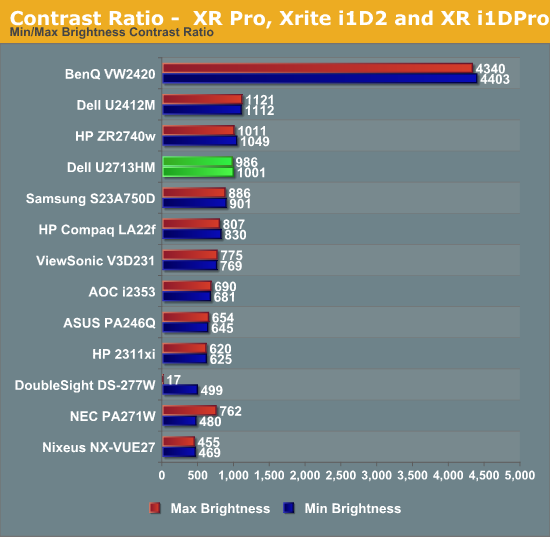
Last review I changed how I measured brightness and contrast to use a 5x5 ANSI grid instead of solid black and white screens in order to provide more accurate data. I wasn’t sure how this would impact screens, making comparisons between models harder. Measuring the center square of the 5x5 ANSI grid, the maximum brightness I could obtain from the U2713HM is 343 nits, which is very close to the 350 nits listed in the specs. With the backlight set to minimum that drops down to 28 nits, giving you a wide range of brightness levels to choose from.
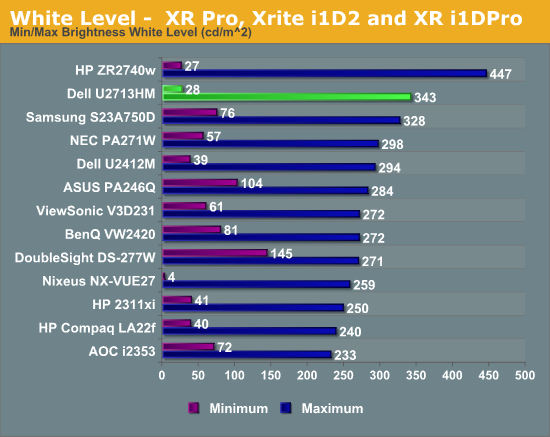
Black levels are where I expected the most impact with the new testing, since an ANSI grid prevents LED systems from going to full black. Preventing these systems from kicking in gives a much better real-world idea of the contrast ratio for a monitor. The U2713HM does a good job with the new measurements, as seen in the chart below.
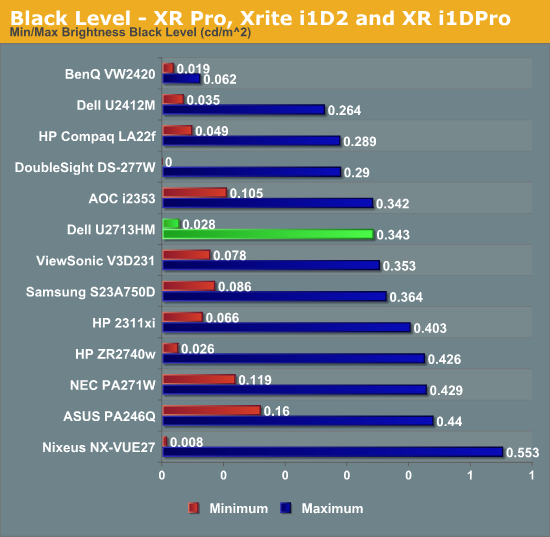
Figuring out the contrast ratio from the avove data is simple. There’s some slight rounding, but otherwise we see contrast ratios very close to 1000:1 for the display at both maximum and minimum brightness. This stacks up very well compared to all the other 27” displays that have been tested, and using a more stringent standard. The contrast numbers from the Dell are very good overall,
With a good foundation of brightness and contrast levels, it’s time to see how the Dell performs with color.


 Facebook
 Twitter
 RSS
RSS


101 Comments
View All Comments
p05esto - Monday, October 22, 2012 - link
One problem with the Ausus is they use that stupid PWM backlight flashing to set the brightness. It can tire your eyes and some people are sensitive to it. This Dell monitor is one of the very few that don't use that old backlight technology.Read more here:
http://www.tftcentral.co.uk/articles/pulse_width_m...
I wish I knew in real life how this felt. The PWM is supposed to be even more noticable with PED backlit monitors, so I'm leaning towards the Dell right now as a result.
johan05156150 - Friday, November 2, 2012 - link
I had a major backlight bleeding:http://i.imgur.com/YqH5e.jpg
Fartunately I could retourn it.
July 2012, Rev A00
anuprav - Saturday, November 10, 2012 - link
On 07.11.2012 I have ordered DELL U2713HM after doing lots of survey over the net and found this Monitor to be good choice.Eagerly waiting for the delivery and will write comments about it.
Calon - Wednesday, December 12, 2012 - link
Expires Thursday, December 13, 2012 this sale, but it is now $630 at dell's site:http://accessories.us.dell.com/sna/productdetail.a...
with coupon code: GXGR7B6RJP354G
And ironically on the sales page they quote this review of the product from this site, "Unbeatable performance out of the box", lol.
Calon - Wednesday, December 12, 2012 - link
clicked the submit button too fast before editjwardell - Monday, December 24, 2012 - link
Costco.com is selling it for 649.99 inc shippingandreas12941 - Tuesday, January 29, 2013 - link
The YCbCr problem can be fixed by overriding the EDID data of the display:http://embdev.net/topic/284710
Bodo - Sunday, February 3, 2013 - link
Hi,I use the monitor with a macbook pro and in the sRGB mode. With the EDID override method I get RBG colors. So far so good.
But it seems that some light grey colors are more yellow. I notice this first as I look at the Apple website. They use a lot of shadows and these shadows have a yellow tinge. So the shadow effect is looking really bad. WIth the MacBook display everything looks fine and grey is grey. On every other display I have tested the Apple website and the grey tones look normal.
In the multimedia mode there is no yellow tinge.
Is this normal for the sRGB mode?
Or what could be the problem here?
I have also tested the monitor with a windows laptop. The same problem. So it has nothing to do with
the macbook pro and the RGB problem.
davidm71 - Friday, March 29, 2013 - link
I just did my own unboxing and as impressive on how they packaged the monitor I suffers from some serious weaknesses such as IPS glow and backlight bleed that is out of control!alesgola - Thursday, August 21, 2014 - link
Thank you for a great and very usefull review. I would like to make shure what " These only apply to the included sRGB mode in the display, so you should make sure to use that, and reset your video card LUT, to achieve these results." in case of my mac mini (late 2012). Do I understand i correctly, that I should go to Display/Profile menu of MacOs and select the option "Adobe sRGB ..."? Thank you in advance for your reply.