



Samsung Galaxy Nexus & Ice Cream Sandwich Review
by Brian Klug & Anand Lal Shimpi on January 18, 2012 1:34 PM ESTBattery life remains the other big axis on which smartphones are judged, and here we've turned to our regular 2011 suite of battery life tests to see how the Galaxy Nexus shakes out. Our battery life testing consists of a page loading suite which loads through a few dozen pages endlessly on both WiFi and cellular data until the phone dies, with the display set at 200 nits. For the cellular tests, we're always careful to test in cellular environments with decent signal (at least -75 dBm or higher) as well, since that's a factor. Next is a simple call test where we play music at both ends of a call until the device under test dies, and our final test is a WiFi hotspot workload which consists of four page loading tabs and a 128 kbps streaming MP3 station that runs until the phone dies.
First up are the web browsing tests over cellular 3G; this means EVDO Rev.A for the CDMA/LTE version, and WCDMA T-Mobile for the GSM/UMTS device.
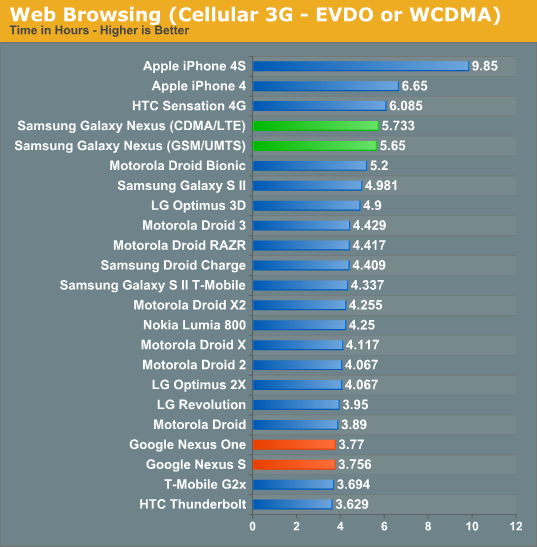
The Galaxy Nexii both do surprisingly well. I'm actually very impressed with how long the devices lasted subjectively on 3G and this definitely backs that up. Of course, both devices include beefy batteries, but Samsung has done a nice job thus far including big batteries without making devices bulky or heavy.
Next up is the same test, but on 4G LTE for the CDMA/LTE variant.
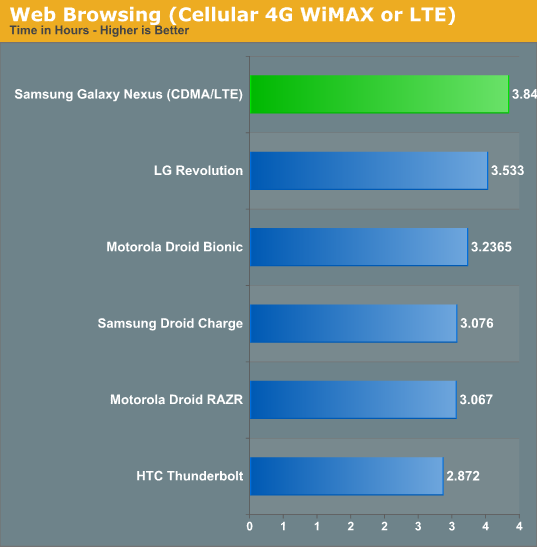
The Galaxy Nexus doesn't post numbers very far in front, but manages to come in the top of the pack on 4G LTE at just under 4 hours. This is a pretty impressive result, honestly, considering that CMC221 is likely made on the same 45nm manufacturing process as CMC220. Again, I'm impressed with the Galaxy Nexus' longevity even on 4G LTE.
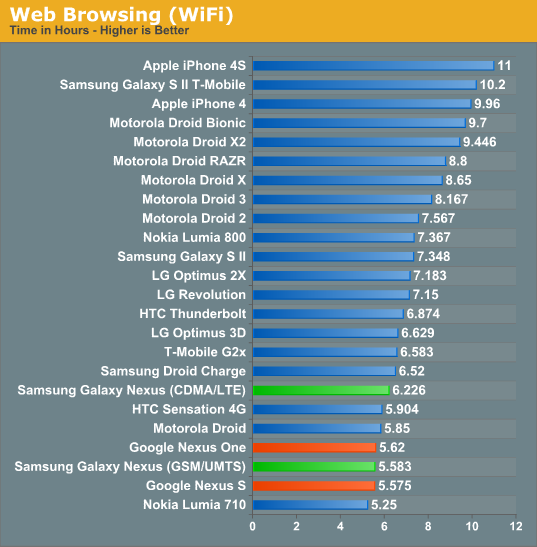
Surprisingly, the Galaxy Nexus can't break past that 6 hour mark even on WiFi, however, which does lead me to think we might be constrained by driving that display.
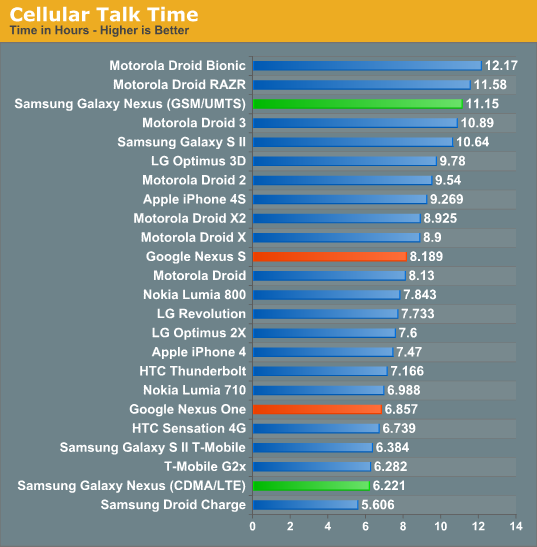
If you ever wanted to see how much difference having a different cellular architecture makes, see above. The GSM/UMTS Galaxy Nexus lasts impressively long on a voice call, at over 11 hours, yet its CDMA/LTE brother lasts just over half that.
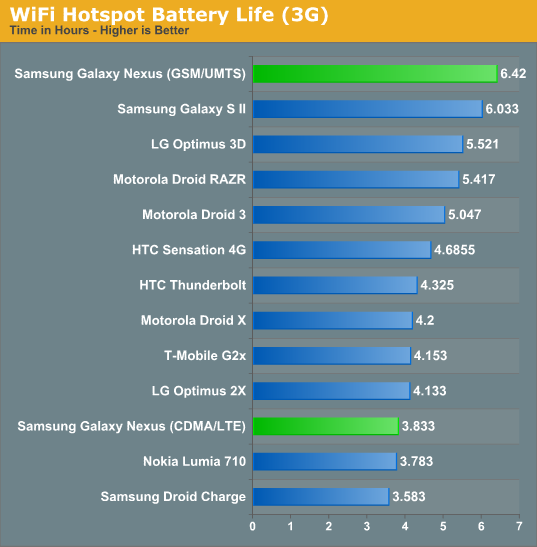
WiFi hotspot on 3G tells the same story - I'm not sure what Via Telecom's CBP7.1 draws in its active state for EVDO or 1x voice, but it seems to eat up more power than the XMM 6260 (X-Gold 626) in the GSM/UMTS Galaxy Nexus.
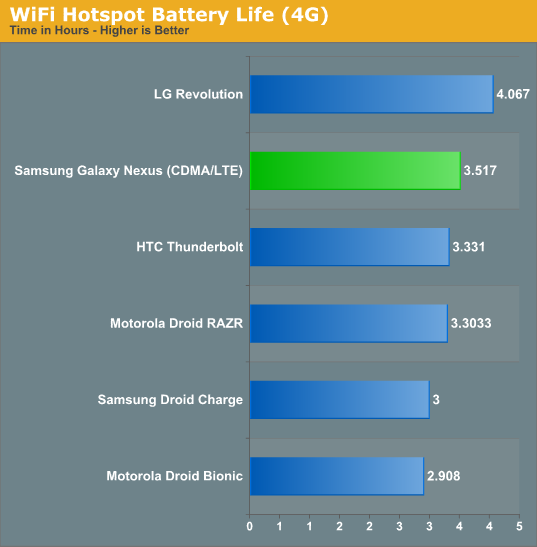
As a 4G LTE WiFi hotspot, the Galaxy Nexus loses its edge over the Revolution, but does come in just ahead of the rest of the 4G LTE herd.
The story of battery life on the Galaxy Nexus unsurprisingly depends on which variant you're talking about. For a phone with a 4.65" display, I'd say I'm impressed with the battery life on both devices - remember that the area that needs to get lit up goes as r^2 - increasing that and not killing the battery is a big feat. In addition, I'd wager that using the OpenGL ES renderpath (and accelerated browser in 4.0) definitely helped both Galaxy Nexus devices post impressive scores. As for the two variants, the GSM/UMTS device has impressively long battery life pretty much across the board. Playing with that phone, I was rarely wanting for more on my regular use schedule (I charge at night on my nightstand). We've seen XMM6260 before in numerous devices where it seems to be a pretty good citizen.
The CDMA/LTE variant, on the other hand, depends strongly on what air interface you end up using most - on 4G LTE the device comes in at the front of the pack usually, and its 3G web browsing test is above average. However, if you make a lot of voice calls, the phone might not cut it. Unsurprisingly the CDMA/LTE Galaxy Nexus does nothing to dramatically change 4G LTE battery life - for that we're still waiting for upcoming 28nm LTE basebands.


 Facebook
 Twitter
 RSS
RSS


185 Comments
View All Comments
zorxd - Thursday, January 19, 2012 - link
And what exactly is more efficient?c4v3man - Thursday, January 19, 2012 - link
Their implimention of pseudo-multitasking as opposed to the much more flexible multitasking in Android.erple2 - Friday, January 20, 2012 - link
Bingo!Since the iOS can't do "true" multitasking, primarily as a design decision on Apple's part to greatly improve battery life (seen the battery life numbers on WebOS? They're pretty terrible), the requirements for memory are generally quite a bit lower than for Android.
You could argue all day as to which one is better, and still not come up with a clear winner. This is strictly due to the phone form factor. Given the limitations on usable screen size (can't display 2 apps at once reliably), and that you have to rely on battery life, the argument of which is "better" is more difficult to make. These all disappear when power is no longer a serious concern (desktop), nor physical screen display (notebook through desktop).
zorxd - Friday, January 20, 2012 - link
yeah and DOS is better because it works fine with only 1MB RAM.OCedHrt - Friday, January 20, 2012 - link
Which is fine due to fast app switching.trob6969 - Wednesday, January 18, 2012 - link
You didn't have to sacrifice GPU performqnce for a 4.3 inch 720p HD display. You could have done what i did and got an htc rezound. I downloaded Dead space, which is probably one of the most GPU demanding games for a phone, and gameplay is FLAWLESS on it! ZERO choppiness throughout the game. My rezound plays this game just as smoothly as my playstation 3. That says a lot about a phone's performance.metafor - Wednesday, January 18, 2012 - link
Note that with the increased clockspeed to the SGX540, the OMAP4460 matches the GPU performance of a Snapdragon S3 (used in the Rezound).Both chips perform similarly with the CPU clock at 1.2GHz (compare Sensation 4G to GN, for example).
dwang - Wednesday, January 18, 2012 - link
Deadspace runs perfectly fine on the galaxy nexus. No choppiness or slowdown.Zoomer - Thursday, January 19, 2012 - link
TI probably didn't anticipate the move to such high resolutions. The 540 was probably chosen as a good enough solution, given the power reqs are well.This is where Apple's hardware-software codesign wins out.
Johnmcl7 - Wednesday, January 18, 2012 - link
That reasoning that microSD cards are too slow seems to only apply to some of the cheap phones which pretty only use micro SD storage, for a phone like the Nexus it doesn't matter as you say because the micro SD card is for storage rather than applications. I don't really understand why the Nexus doesn't get a harder time for the lack of microSD storage given the relatively low onboard storage and high spec which means it can play back high resolution video which needs quite a bit of space. It's one of the main reasons I went for the Note instead which has the better camera, faster GPU and the micro SD storage allowing me to add 32GB very cheaply (and more down the line when 64GB cards come down in price) which is pretty necessary as the high resolution video recording and other features chew through space very quickly.John