



The Apple iPad 2 Review
by Brian Klug, Anand Lal Shimpi & Vivek Gowri on March 19, 2011 8:01 PM ESTDisplay
The iPad 2 continues to use what boils down to the same 9.7 inch 1024x768 (XGA) LCD as the iPad 1. It isn’t the 300 or close PPI display that many speculated would launch with the iPad 2. Instead, for the most part, it’s identical to the 132 PPI panel which shipped in the first iPad.
Side by side the two have very similar brightness, black level, and contrast. That said, we’ve noticed some differences in the numbers between the four iPad 2s spread among us. Two are 16 GB WiFi models, one is an AT&T WiFi - 3G, and another is Verizon WiFi - 3G. Each have slightly different brightness and black levels, and correspondingly different contrast as well.
| Display Quality Comparison | |||||
| White Level | Black Level | Contrast Ratio | |||
| Apple iPad 2 #1 (AT&T 3G) | 406 nits | 0.42 nits | 966:1 | ||
| Apple iPad 2 #2 (VZW 3G) | 409 nits | 0.49 nits | 842:1 | ||
| Apple iPad 2 #3 (WiFi) | 352 nits | 0.45 nits | 778:1 | ||
| Apple iPad 2 #4 (WiFi) | 354 nits | 0.41 nits | 859:1 | ||
After looking at the numbers we’ve collected, there seems to be a pretty obvious trend emerging. The WiFi iPads seem to have a brightness closer to 350 nits, whereas the 3G models have brightness levels at 400 nits. It seems entirely possible that there are either multiple suppliers for these panels, or different batches with differing performance characteristics between the WiFi and 3G manufacturing lines.
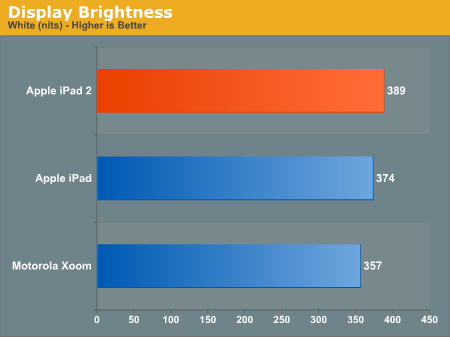
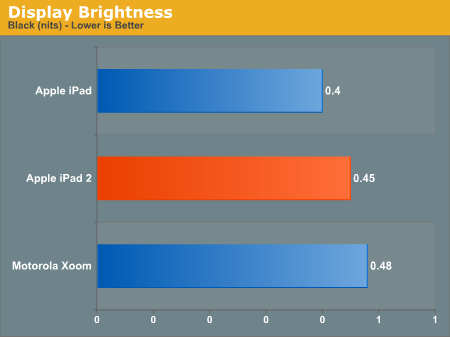
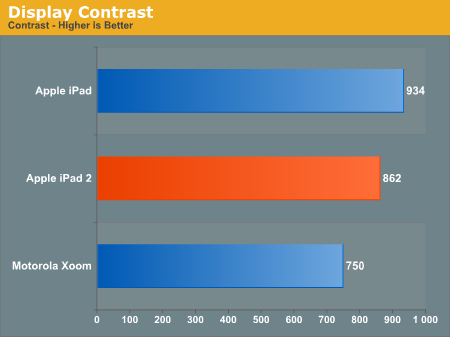
We measured white point on the iPad 2 with an X-Rite i1Pro and found that (at least my AT&T 3G model) it was right at 6604K, very close to D65 and good performance. Conversely, the iPad 1 WiFi on hand measured around 6908K which is admittedly still acceptable, but not quite as good. In reality, there will probably be a large amount of drift in color temperature across different panel suppliers and batches, just like we saw with the Verizon iPhone 4’s noticeably blue display.


Indoor viewing angles on the iPad 2’s IPS display are still excellent. Uniformity is also good, with one caveat.
There’s been a lot of talk about backlight bleeding on the iPad 2. Initially, I didn’t notice any backlight bleed on my iPad 2, however I now notice a small blotch where backlight bleeds in the bottom right corner. Pressing on the glass surface, I can change the intensity of this backlight bleed, which would imply that the bleed is due to stresses in the glass and TFT like you’d see if you were to press on a panel. It’s not bad at all, especially compared to some of the worst-affected examples I’ve seen in forums online, but hopefully this gets worked out with better manufacturing. Oddly enough, side by side with the iPad 2 the iPad 1 also shows some noticeable light bleed.
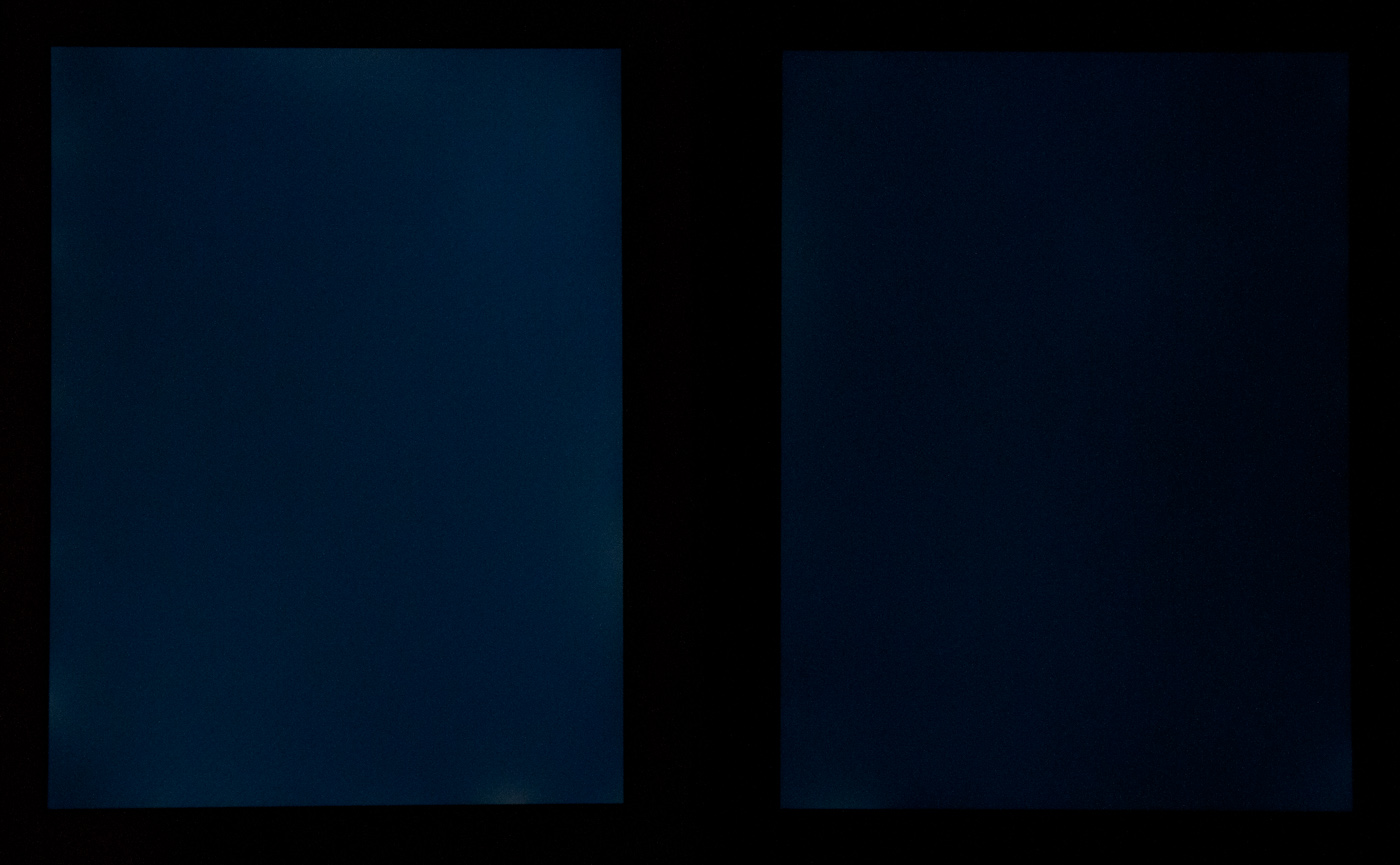
Left: iPad 2, Right: iPad 1
Outdoor glare and viewing angles are essentially unchanged. Subjectively the iPad 2 seems a tiny bit better, perhaps thanks to the slightly thinner glass and adhesion process, but it’s still hard to read anything outside in direct sunlight.
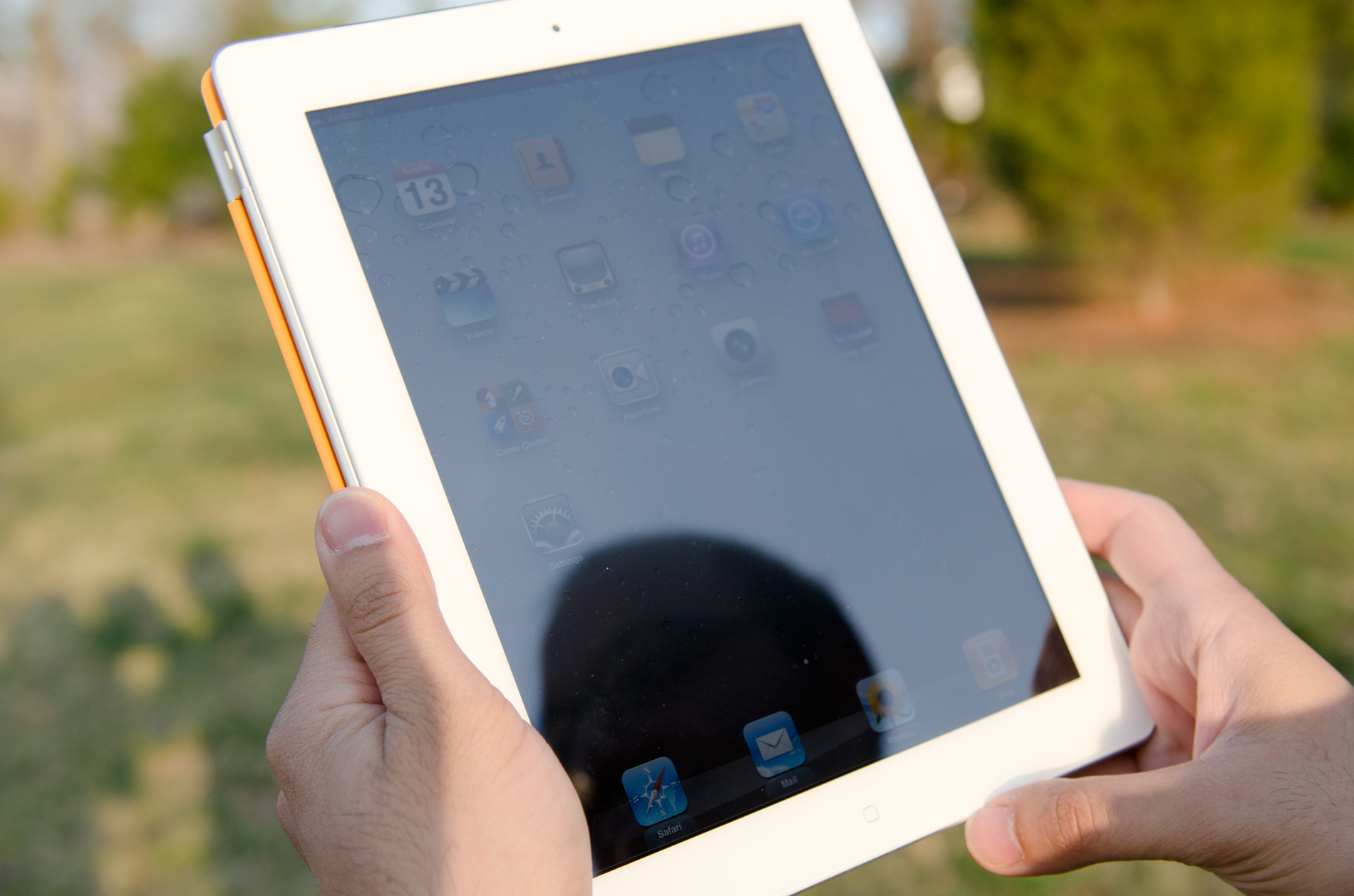
Compared to the Xoom, the iPad 2 is more usable outdoors:


 Facebook
 Twitter
 RSS
RSS


189 Comments
View All Comments
jalexoid - Saturday, March 19, 2011 - link
The movie editing app on Honeycomb is there. And it's similar to iMovie.The Office look alike apps on iPad are still not good.
Honeycomb struggles on the apps side, because the developer hardware was not there, when it was needed.
But saying "So far only iOS has the most real apps" is a bit incorrect.
WaltFrench - Sunday, March 20, 2011 - link
“The movie editing app on Honeycomb is … similar to iMovie.”Yes, except for one thing: the YouTube of it shows it unable to show thumbnails properly and balky, rough animations. This wouldn't even get bronze at a beer-fueled coding contest.
The two are exactly as similar as night and day: they live on the same planet.
Zoomer - Saturday, March 19, 2011 - link
>>Also, when you take it out in front of a client during a lunch meeting, it tends to impress them.That's probably why most buy it.
Azethoth - Sunday, March 20, 2011 - link
I bought my iPad to turn my daily NY Times habit at Starbucks paperless. So Wi-Fi only and one year = it paid for itself.Acting as an awesome controller for my home stereo setup is a total bonus. Same with reading books again via iBooks and Kindle.
Yes, the underlying thing is I use it to consume and not to create. Unless you find an application that uses its strength in that regard it will just frustrate you as you try to do your pad-inappropriate netbook / laptop / PC / mini / mainframe or whatever apps on it.
For me its a perfect way to avoid the netbooks / laptops which I have always loathed but get a little mobility. But then I only create on a desktop with 2560 x 1600 resolution so laptops will never cut it anyway.
synaesthetic - Sunday, March 20, 2011 - link
It's pretty refreshing to see someone who has actually found a usable niche for these things.It's just not too useful to a lot of folks. I carry my laptop to class already--yeah, this big, heavy MSI gaming laptop--because I need it. If I could carry something as light as the iPad and have it do what I need... I'd be sold.
But it can't. And LCDs suck for long reading sessions. I'd rather have an ereader.
doobydoo - Sunday, March 20, 2011 - link
what is it you can't do on an ipad?LaughingTarget - Tuesday, April 19, 2011 - link
Quite a bit, really. It's a lousy drafting platform. Don't try doing anything remotely related to engineering on it. Want to create a proprietary program to tie into your own business systems at work? Don't bother, you're not putting that thing on your iPad without Apple's permission. Don't bother trying to type anything lengthy up on the thing, you'll be operating, at best, on about 1/4 speed as a keyboard. It's a useless tool for accountants, field technicians needing to keep track of customer data, worthless for engineers trying to troubleshoot a power plant turbine on-site. Hell, it's even a horrible method of ringing up orders at a fast food joint.Go down the list of what people do for a living, the meat of the modern global economy, and you pretty much found everything the iPad can't do.
kevith - Sunday, March 20, 2011 - link
Use it as an E-reader?Well, only for books, that the the censors at Macintosh find good, clean and familyfriendly enough, that is.
"When You start burning books, You will eventually end up burning people."
That fact does not change over time...
WaltFrench - Sunday, March 20, 2011 - link
Let's be a bit more honest here: Heine was talking about government-sanctioned political violence, not commercial decisions. In fact, the considerations are almost exactly opposite.Commercial decisions have dozens of considerations, including authors' willingness to grant rights (e.g., Nabokov's Pale Butterfly not in any e-form), format (the wonderful Visualizing Information, also MIA) and a host of others. Freedom of speech implies the speaker's right to choose when and how he speaks; that means Apple's right to make commercial decisions about what it offers and what it does not.
E.g., Apple no longer sells a camera, but they don't in any way restrict your ability to buy them or use them. Re books: if you like Kindle, for example, read them on the iPad. (As long as Amazon chooses to carry the work.) This is just like say, the B&N store across from my office: they don't carry titles they don't want, whether for expected lousy sales, or to keep the local Bigots United chapter from waving pitchforks at them. This freedom of Apple, which is NOT an arm of the US Government, to have its own voice, is just as important as preventing governments from banning speech.
Maybe there is somebody at Apple who wants to treat you like a child. But about a hundred times more likely is that they simply want to do the stuff they think they do best, and some people act (childlishly!) as if Apple should run by different principles.
PS: “Macintosh” is not the company you're talking about.
vision33r - Saturday, March 19, 2011 - link
The last thing you want is bring that $899 device in front of people and have app crashes and App drawer that doesn't work when you press it like a zillion times.People at work will just say you blow $899 on a netbook.
Yes, the LCD on the Xoom is the typical 10.1" you found on Acer Netbook parts bin.
How dare Motorola try to pass off a netbook for $899. How about the ASUS EEE Slate for $999 instead.