



OCZ's Agility 2 Reviewed: The First SF-1200 with MP Firmware
by Anand Lal Shimpi on April 21, 2010 7:22 PM ESTRandom Read/Write Speed
This test reads/writes 4KB in a completely random pattern over an 8GB space of the drive to simulate the sort of random access that you'd see on an OS drive (even this is more stressful than a normal desktop user would see). I perform three concurrent IOs and run the test for 3 minutes. The results reported are in average MB/s over the entire time.
I've had to run this test two different ways thanks to the way the newer controllers handle write alignment. Without a manually aligned partition, Windows XP executes writes on sector aligned boundaries while most modern OSes write with 4K alignment. Some controllers take this into account when mapping LBAs to page addresses, which generates additional overhead but makes for relatively similar performance regardless of OS/partition alignment. Other controllers skip the management overhead and just perform worse under Windows XP without partition alignment as file system writes are not automatically aligned with the SSD's internal pages.
First up is my traditional 4KB random write test, each write here is aligned to 512-byte sectors, similar to how Windows XP might write data to a drive:
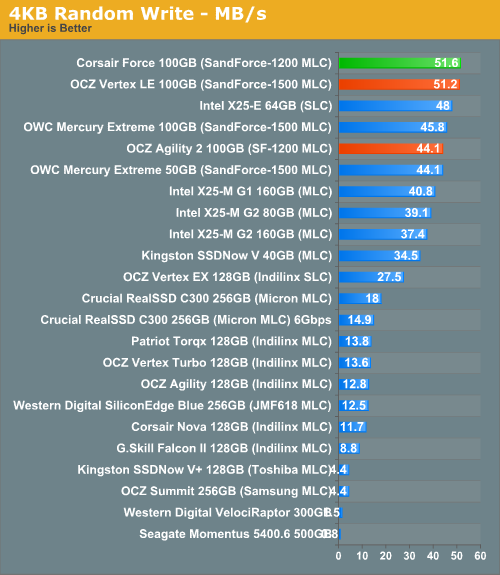
Here we see the first real impact of the SF-1200's final, shipping firmware. Random write performance drops down a bit, but not by a lot. However the SandForce controllers perform best when run in OSes that align across 4K boundaries:
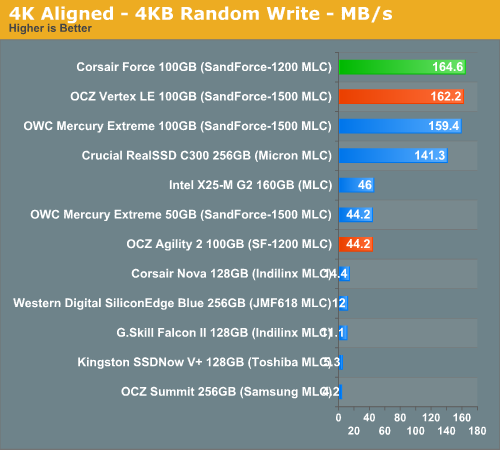
Here we see a dramatic drop. While the SF-1500 and SF-1200 (3.0.1) based SSDs manage over 160MB/s, the standard SF-1200 (3.0.5) can only push 44.2MB/s. That's still much faster than a HDD, but it ends up being slower than both a C300 and Intel's X25-M G2.
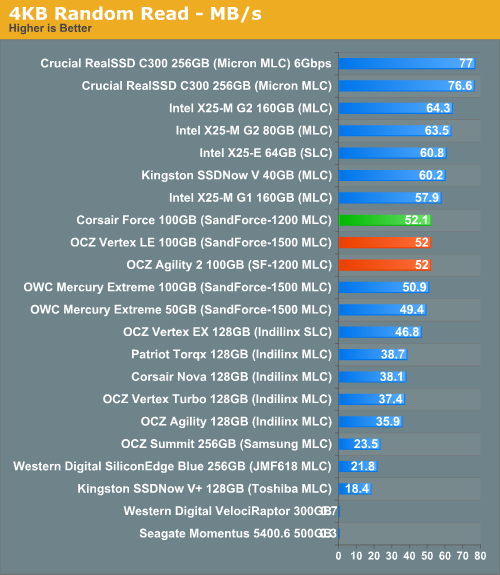
The performance limitation only applies to small file random writes. Random read performance remains unchanged with version 3.0.5 of the SF-1200 firmware.


 Facebook
 Twitter
 RSS
RSS


60 Comments
View All Comments
ogc - Thursday, April 22, 2010 - link
That file 512mb in size which compresses 1000x seems to simply full of zeros, so it represents best case performance for sandforce. On the other hand pure random writes are not expected in typical computer usage so they also are not very meaningful. Any chance to feed iometer with data from your storage bench for example?arehaas - Thursday, April 22, 2010 - link
I actually think random writes with compressed files are meaningful.JPEG files are highly compressed - you can gain only 1-3% by zipping them. Those who work with such files a lot - write to the disk or move around jpegs or similar compressed graphic and video files - should be paying most attention to these new tests for Sandforce. It may be a good idea to add the results for all (most) drives to the page with random writes chart as another chart "Random Writes - Compressed files".
arehaas - Thursday, April 22, 2010 - link
Thanks to the new tests, it appears the charts of rnd or seq writes are currently misleading with respect to Sandforce, if most of your important files (e.g., for a graphic designer) are compressed. The charts are easier to read than text. Currently, one has to flip pages to and from the "Random Data performance page" in order to get the true picture. Maybe Anand can add a bar with "Corsair with compressed data" to the read/write charts? Thanks.davepermen - Thursday, April 22, 2010 - link
I guess that drive is not that well suited for video editing, where you have mostly random data (compressed and uncompressed, both look rather random to the drive). it wouldn't be bad in any way, just lose it's peak performance.FragKrag - Thursday, April 22, 2010 - link
Up until about a week or two ago I was set on an Intel X25-M G2 80GB, but now I'm not so sure anymore. If I got a Vertex 2/Agility 2, it would be a 50GB version... decisions decisions.Oh, and prompted by this article, I looked for the pricing of the Vertex Indilinx on Newegg, and I found this 50GB Vertex LE at $200
http://www.newegg.com/Product/Product.aspx?Item=N8...
never knew they had a 50GB run of Vertex LEs...
willscary - Thursday, April 22, 2010 - link
After my problems last week, I ended up going back to the Crucial M225 series with the Indilinx controller. It is not quite as fast, but it does have a 5 year warranty. I paid $325 for the 128GB drives and a very low $579 for a 256GB drive from Newegg.I have been using these drives in several machines since the beginning of the year. They all support TRIM and I have had no problems. They are very fast in daily use. I had hoped the Sandforce drives would be faster, but I guess I will have to wait for a later date to find out (I will be purchasing another pair of computers in July after the new fiscal year begins...perhaps I will purchase the Sandforce SSDs at that time).
Look09 - Thursday, April 22, 2010 - link
What happens when you use TrueCrypt to encrypt your OS.? Does it then random-write everything and indilinx is better? Does it make the Vertex 2 much better? Or no difference?Ryan Smith - Thursday, April 22, 2010 - link
Encrypted data should look like random noise, and as a result should have very little compressibility. I haven't used TrueCrypt, but it's my understanding that it writes garbage data to whatever part of the hidden partition isn't in use, so the whole thing should largely be uncompressible and match our random data performance.semo - Thursday, April 22, 2010 - link
I'm interested in encrypted testing also. These controllers are beginning to look like very fast consumer drives rather than enterprise (if the SATA interface wasn't a big enough hint already).I'm also wondering why are they getting a more substantial performance hit when writing compressed random 4k writes compared to 2MB sequential writes (74.4% vs 57.4%).
Just to re instate, why are all these SSD makers coming out with SATA drives and calling them enterprise? AFAIK, Intel and Hitachi are working on an SAS SSD but I'm not aware of any other reasonable company doing the same (i'm totally ignoring what the military might have because costs there are nuts).
Mugur - Thursday, April 22, 2010 - link
... Too bad that the price is still high so I'm very interested for the low-end 40 GB ones, but with good random 4k writes. I have 5 machines at home waiting for this upgrade as the boot drive. :-)Allow me to thank you, Anand, for your dedication and work.