



The SSD Relapse: Understanding and Choosing the Best SSD
by Anand Lal Shimpi on August 30, 2009 12:00 AM EST- Posted in
- Storage
The Instruction That Changes (almost) Everything: TRIM
TRIM is an interesting command. It lets the SSD prioritize blocks for cleaning. In the example I used before, a block is cleaned only when the drive runs out of places to write things and has to dip into its spare area. With TRIM, if you delete a file, the OS sends a TRIM command to the drive along with the associated LBAs that are no longer needed. The TRIM command tells the drive that it can schedule those blocks for cleaning and add them to the pool of replacement blocks.
A used SSD will only have its spare area to use as a scratch pad for moving data around; on most consumer drives that’s around 7%. Take a look at this graph from a study IBM did on SSD performance:
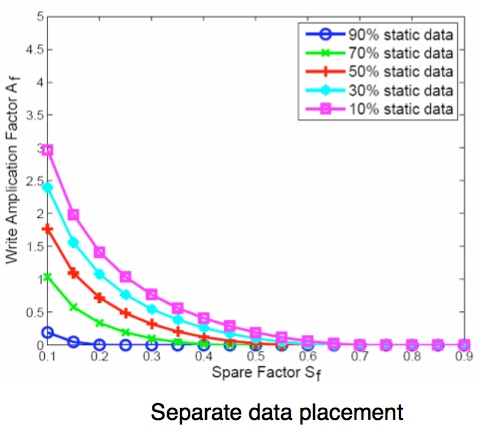
Write Amplification vs. Spare Area, courtesy of IBM Zurich Research Laboratory
Note how dramatically write amplification goes down when you increase the percentage of spare area the drive has. In order to get down to a write amplification factor of 1 our spare area needs to be somewhere in the 10 - 30% range, depending on how much of the data on our drive is static.
Remember our pool of replacement blocks? This graph actually assumes that we have multiple pools of replacement blocks. One for frequently changing data (e.g. file tables, pagefile, other random writes) and one for static data (e.g. installed applications, data). If the SSD controller only implements a single pool of replacement blocks, the spare area requirements are much higher:
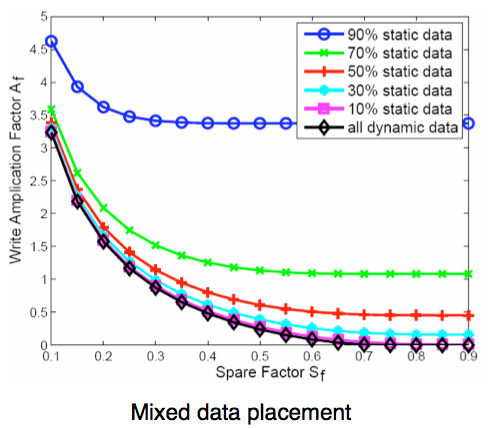
Write Amplification vs. Spare Area, courtesy of IBM Zurich Research Laboratory
We’re looking at a minimum of 30% spare area for this simpler algorithm. Some models don’t even drop down to 1.0x write amplification.
But remember, today’s consumer drives only ship with roughly 6 - 7% spare area on them. That’s under the 10% minimum even from our more sophisticated controller example. By comparison, the enterprise SSDs like Intel’s X25-E ship with more spare area - in this case 20%.
What TRIM does is help give well architected controllers like that in the X25-M more spare area. Space you’re not using on the drive, space that has been TRIMed, can now be used in the pool of replacement blocks. And as IBM’s study shows, that can go a long way to improving performance depending on your workload.


 Facebook
 Twitter
 RSS
RSS


295 Comments
View All Comments
Bonesdad - Sunday, October 10, 2010 - link
Been over a year since this article was published...still very relevant. Any plans to update it with the latest products/drivers/firmware? There have been some significant updates, and it would be good to at least have updated comparisons.Well done, more more more!
hescominsoon - Thursday, February 17, 2011 - link
Excellent article but you left out sandforce. I'm curious if this was an oversight or a purposeful moission.PHT - Friday, September 28, 2012 - link
This article is fantastic, the best I ever read about SSD.Any follow up with new SATA III drives and new controllers like SandForce, new Indilinx etc.?
I will be glad to see it.
My Best
Zygmunt
lucasgonz - Wednesday, October 16, 2013 - link
Hello everyone.This post is quite old but I hope someone can answer.
I am concerned about the life of my ssd (sandisk extreme 240). I performed partitions ignoring the issue of the level of wear and partitions. I have it for one year ago with a 30gb partition and one with 200GB. I wanted to use large drive for data but I did not have time for that and just use the first 30gb partition . My question is if the ssd may be damaged by using only a little segment. DiskInfo shows 10tb reading 18 tb and writing.
sorry my poor English.
Thanks for any help.
Ojaswin Singh - Monday, January 13, 2014 - link
Hey,This is the most informative article i have ever read.Can You Please clear Out Some Of my Doubts:-1.Does Playing Video Games or Running Programs add to Writing on the SSD
2.Is 1 Write Cycle=Filling 120GB of SSD once
3.I really write on my HDD a lot(Seriusly a Lot) So how much life cycle can i expect from Samsung 840 SSD(Neither Pro nor EVO) I mean for how much time can i expect it to be writable
Please Help me cause i want the speeds of SSD but i want it to last for me too
Thanks,
Ojaswin