



SMB NAS Roundup
by Ross Whitehead Jason Clark Dave Muysson on December 5, 2006 3:30 AM EST- Posted in
- IT Computing
NAS Roundup
Network attached storage (NAS) is a hot market these days, not only for the SMB (Small to Medium Business) market, but also for the home user. As more and more computers appear in our homes, the need for shared storage is becoming a lot more prevalent than in the past. Also, with drive sizes approaching a terabyte, backing up and storing important files requires more than the typical single drive enclosures. The million dollar question, however, is which device do you buy?
With Gigabit networking and multiple drives on all these devices we went into this article with the hope of high throughput. Unfortunately this was short lived once we dived into the benchmarks. Most of these devices are running tiny processors and software-based RAID. The result is transfer rates that average 10MByte/second, which is quite slow if you're used to copying data off of a hardware based RAID array. However, the purpose of these devices isn't necessarily to be able to read and write at theoretical gigabit line-speeds. These devices are designed to provide long term shared storage, backup a few machines on a network, or stream a few DVDs to a media device.
The most difficult part of this article was developing the benchmarks. There are a number of different utilities out there to perform I/O benchmarking, and some are better than others. We tried IOMeter, IOZone, and we developed a couple of our own. The problem we kept running into was that most of the benchmarks were not producing numbers similar to a windows file copy, which is exactly what most users will be doing. In the end, we selected IOMeter and we developed a very simple command-line benchmark that will time a file copy. Descriptions and links to these benchmarks are on the test configuration page.
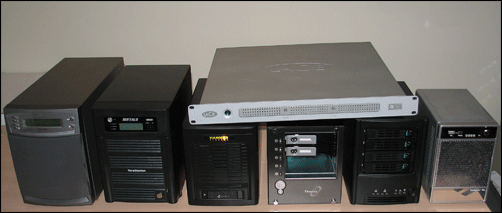
Network attached storage (NAS) is a hot market these days, not only for the SMB (Small to Medium Business) market, but also for the home user. As more and more computers appear in our homes, the need for shared storage is becoming a lot more prevalent than in the past. Also, with drive sizes approaching a terabyte, backing up and storing important files requires more than the typical single drive enclosures. The million dollar question, however, is which device do you buy?
With Gigabit networking and multiple drives on all these devices we went into this article with the hope of high throughput. Unfortunately this was short lived once we dived into the benchmarks. Most of these devices are running tiny processors and software-based RAID. The result is transfer rates that average 10MByte/second, which is quite slow if you're used to copying data off of a hardware based RAID array. However, the purpose of these devices isn't necessarily to be able to read and write at theoretical gigabit line-speeds. These devices are designed to provide long term shared storage, backup a few machines on a network, or stream a few DVDs to a media device.
The most difficult part of this article was developing the benchmarks. There are a number of different utilities out there to perform I/O benchmarking, and some are better than others. We tried IOMeter, IOZone, and we developed a couple of our own. The problem we kept running into was that most of the benchmarks were not producing numbers similar to a windows file copy, which is exactly what most users will be doing. In the end, we selected IOMeter and we developed a very simple command-line benchmark that will time a file copy. Descriptions and links to these benchmarks are on the test configuration page.


 Facebook
 Twitter
 RSS
RSS


23 Comments
View All Comments
dropadrop - Monday, December 11, 2006 - link
How was the noiselevel measured for the device? I was considering the Intel since it's easily available here, but previous reviews have stated it was far from silent. Here's a quote from toms:I'm pretty allergic to noise, currently the noisiest thing I have is a Buffalo Linkstation, which I have allready stuffed in a closet and end up turning off when not used.
eaglemasher - Monday, December 11, 2006 - link
I've had an infrant readynas NV running for about 10 months, and I am impressed with the overall experience. The access speeds are much faster than my other NAS device, the firmware updates are very regular, the support staff are responsive, and it's quiet. Then there's the fact that it supports pretty much any network file system you want to throw at it and supports long path lengths and I am one very satisfied customer. Perhaps Infrant's hardware is hit and miss for some people, but in my case I haven't had a hiccup in 10 months of constant use as a backup device for 18 users.My other raid NAS device is a Terastation I've run for about 20 months. My overall assessment is stay the heck away. The only good thing I can say about it is that it hasn't failed yet, but the speeds are pretty dismal, the interface is very limiting, and the path length limitations make it unusable as a direct-copy backup device. Add to that the fact that Buffalo has not updated the U.S. firmware in 1 1/2 years (though the japanese version gets regular updates), and it's extremely disappointing, especially when contrasted with the ReadyNas. Maybe with the firmware updates the Japanese actually get a useful NAS.
archcommus - Wednesday, December 6, 2006 - link
I'm not too familiar with these devices, can someone tell me what advantage(s) they hold over a home built file server PC? Something cheap and slow but with a large hardware-based RAID array that simply sits in a room with no monitor attached and does its job. Seems that'd be easier and more upgradeable, also probably faster.yyrkoon - Wednesday, December 6, 2006 - link
They hold no real benifit over home built solutions, except that perhaps, like buying a Dell PC, you dont have to build/provide support for it yourself. For a home brew solution, you can use whatever you like, however you like, and dont have to worry about proprietary hardware. Granted, OEMs have more experience in this arena, so when you do build your own, you may have to learn what works, and what doesnt, on the fly.Anyhow, thats the way I see it, maybe someone else can answer further if I missed something.
TheBeagle - Wednesday, December 6, 2006 - link
I know that evaluators are most times constrained by time limits for their work, but I believe you guys missed a very good NASA box offering along the way. I'm speaking about the latest offering from U.S. Robotics, Model 8700. It is a four-bay box, with gigabit ethernet connection, 2 additional USB 2.0 ports, and is very well constructed. It comes without any drives, which allows the vendor/user to select their own drive (WD500YS drives work great in it), and can array four drives of 500 GB each into a RAID 5 setup that works like a charm. It has good software and also client backup software. You really ought to evaluate this NAS box as well. It's a winner!mziegler - Tuesday, December 5, 2006 - link
I'm really glad to see this type of review as I have been looking at these devices. However, the review left out any drive failure scenerios. I would like to see included in the review of the Hammer system restoring or rebuilding a RAID array using the Z-FS file system. Also for that system since it uses a proprietary file system a test of grabbing data off of a drive using Dataplows SFSExtract.exe DOS utility.This review focused solely on performance which is only about half the reason someone would purchase one of these devices. The redunduncy which arguably is most important was practically ignored.
A review of this type of product in my opinion must answer the following questions:
- What happens if a drive fails
- What happens if the NAS device fails
- How easy and how long is the recovery process
- What's the relative performance
- Features vs a traditional Unix/Linux/WS2003 NAS head
LoneWolf15 - Wednesday, December 6, 2006 - link
Insightful post. I agree with the parent poster on this one.aikend - Tuesday, December 5, 2006 - link
It would have been really nice if the features table had included the maximum number of drives, and maximum total capacity, for each of the units. Sure, I can go to each vendor's website and track it down by myself, but I would think "disk capacity" would be a pretty important measure for lots of people.JarredWalton - Tuesday, December 5, 2006 - link
Disk capacity will often be determined by the largest HDD available. Right now, that's the Seagate 750GB, so you can do up to 3TB of storage in a four drive unit (which most of these are). When someone makes a larger HDD, there's a pretty good chance all of these NAS units will support it. I'm not sure where the next "barrier" is on SATA/BIOS/OS drive sizes, but after the 128GB limitation was removed I think the next maximum HDD size went up into the many TB range.yyrkoon - Tuesday, December 5, 2006 - link
I've been told that the next limit barrier of 48 bit LBA is more than 2 TB per disk, although, I havent personally read any specifications concerning this. This also isnt to say, that other factors couldnt come into play either (manufactuer using cheaper electronics, and thus reducing the over all limit somehow).